How do I open the boss list?
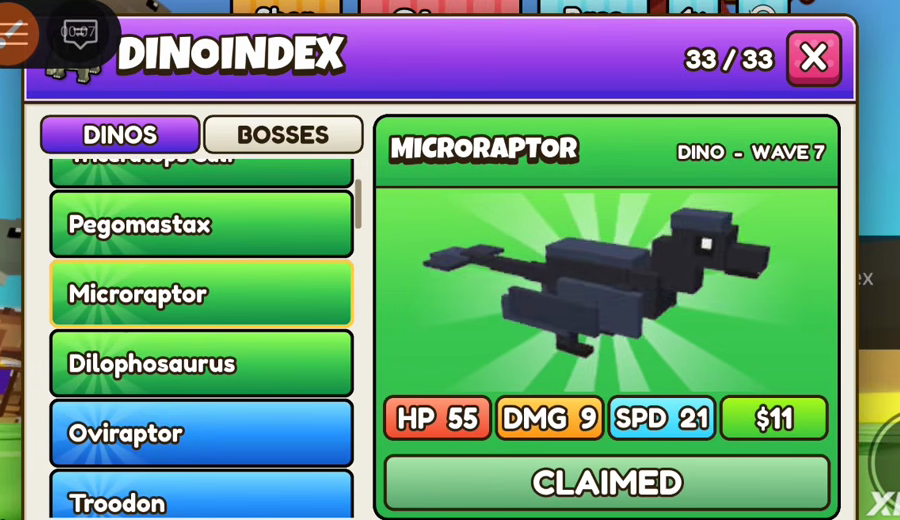
Open Dinos on the left rail. The index has a BOSSES tab next to DINOS. Boss cards use a red header. Mini-boss cards use gold.
Buttons
Every control this page names is a word on a screenshot. If a button is not in that set, it was not on the HUD we recorded.
Updated

Four buttons sit in the top center. Shop is orange. Fight is green until the wave starts, then the same slot becomes a red Stop button. Base is blue. The fourth button reads 1x. That is the speed control as printed. We did not see it change to 2x in the frames kept for this site, so no second speed is listed.
Shop on this bar opens the defense shop, the panel titled DINO SHOP or, later, ELITE TRAPS. It is not a code prompt. Base opens whatever the blue button opens; we did not capture a second screen full of base stats, so this guide stops at the label.

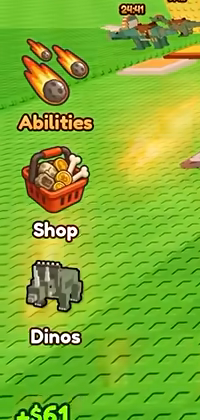
Three labels stack on the left. Abilities is the meteor icon. Shop is the basket, a second way into the shop. Dinos is the head icon and opens DINO INDEX. The index has DINOS and BOSSES tabs and, on the dinos tab, the counter 33/33.
Use Dinos when you want a price that matches a wave. Use Shop when you want the timer stock. Abilities stays a label here. Opening it did not leave a readable ability list in the frames we cropped, and inventing cooldown numbers would be worse than leaving the menu blank.
The fight tells you the wave in a bar: Wave: 13, Wave: 28, and Wave: 51 were read in one video. A smaller line under the bar names a later wave. The digits in front of that line were not sharp enough to copy. Trust the Wave: number, then look up that wave on the boss list if it is 10, 20, 30, or another printed boss wave.
Cash is bottom left, green, with a dollar sign. A popup like +$61 is the payout for a stop, on its way into that total. Friend Boost: +20% sits under the total. NEXT EVENT and a countdown, such as 5:33, sit at the top left. That countdown is inside the session.

Once Dinos is open, you are not steering. You are reading. The header is the name plus DINO - WAVE, MINI BOSS - WAVE, or BOSS - WAVE. The pills are HP, DMG, SPD, and the price. CLAIMED means you already took it. The colored tabs down the left of the index are the header colors, the same greens, blues, purples, oranges, golds, and reds as the cards.
There is no level control on the card. Nothing on it says L or XP. The four pills are the stats. SPD on a boss can be 3.5 or 2.6. SPD on a dino is usually in the teens or twenties. Read the decimal if it is there.
Inside DINO SHOP the tabs are Defense and Blocks. A row shows a name, a dollar price, a stock line, a description, and a button that says Rare, Epic, or Legendary. Restock and New items in are the header controls. HATCH [E] is not in the shop. It is on the Royal Egg, with a hexagon and 79.
The E in brackets is the prompt printed on that button. This guide does not add keyboard binds the screen does not show. If you play on a phone, you press the button. If you play with a keyboard, the label is still HATCH [E].
![HATCH [E] button with hexagon icon and 79](/screenshots/royal-egg-hatch.png)
FROST EGG $10000 and ROYAL EGG are world signs. MAGMA CRATE with a hexagon and 29 is a world object. A Roblox receipt that says Gold Crate - Skip Timer is a purchase dialog, not a HUD button you press every wave. Other players' names and VALUE amounts float over their bases. Leave those alone.
Damage popups such as -400 are combat text. They are not a control and they are not the DMG pill. The DMG pill is the orange one on the index card.
FAQ
Open Dinos on the left rail. The index has a BOSSES tab next to DINOS. Boss cards use a red header. Mini-boss cards use gold.
It is the speed button on the top bar. The frames used here show it sitting on 1x. A higher setting is not documented on this site until a frame shows the other label.